Nexqario
Drift Framework
Drift Framework
Couldn't load pickup availability
1. Problem Statement
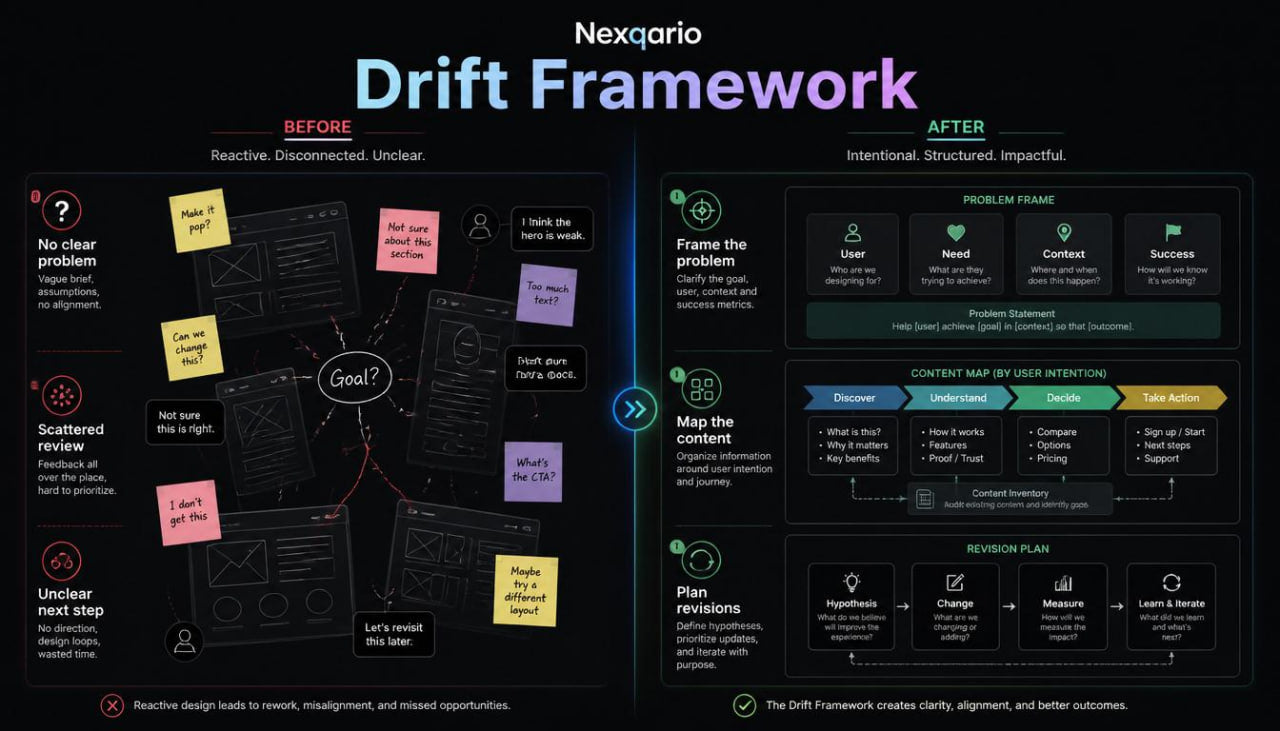
Many learners reach a stage where they can identify basic layout issues, but they still need a stronger method for connecting separate design choices. A screen may have organized spacing, readable text, and clear buttons, yet the full experience can still feel uneven when the flow is not planned carefully. Learners may also struggle to decide which design issue should be addressed first. Without a working framework, practice can become a collection of isolated edits rather than a thoughtful review process. Drift Framework was created to help learners study UI/UX through connected steps, from problem framing to layout planning and reflection.
2. Solution
Drift Framework gives learners a practical structure for reviewing and shaping UI/UX ideas. The tier introduces a design review method built around context, user intention, page purpose, flow, and visual order. Learners study how to define what a screen should help a person do, how to organize information around that goal, and how to notice friction before adding visual detail. The materials guide learners through observation tasks, wireframe notes, content mapping, and simple revision exercises. This tier helps learners move from scattered design opinions toward a more organized study process.
3. What’s Inside
Drift Framework includes a wider set of UI/UX learning materials built around structured design thinking. The tier begins with an orientation section that explains how to approach a design task before starting the layout. Learners are introduced to the idea of framing: understanding the situation, the viewer, the screen purpose, and the action the design should support. This opening module encourages learners to slow down and define the design question before creating or reviewing a screen.
The first main module focuses on problem framing. Learners study how to write short design problem notes in a neutral and practical way. Instead of saying a screen is simply confusing or unattractive, they learn to describe what may be unclear, where attention is divided, and which part of the experience may need review. This helps learners turn a vague reaction into a more useful design note.
The second module introduces user intention. This section explores how a person may arrive at a screen, what they may be trying to understand, and what information they may need before taking action. Learners review common interface moments such as browsing a course page, reading a feature section, comparing materials, filling out a contact form, or moving through a checkout-related flow. The materials ask learners to consider what the viewer might expect at each step and how the interface can support that expectation.
The third module focuses on content mapping. Learners study how to arrange headings, short explanations, visual references, lists, and action areas into a logical page structure. They practice grouping related content, removing repeated ideas, and placing important information where it can be understood in context. This module is especially useful for course pages, landing pages, and learning dashboards, where content must feel organized without becoming too dense.
The fourth module introduces wireframe sequencing. Learners work with low-detail screen planning and learn how to sketch multiple layout options before choosing a direction. The materials show how to compare different section orders, how to decide where a call-to-action belongs, and how to keep page structure consistent across related screens. The focus remains on planning and reasoning rather than final visual polish.
The fifth module explores interaction notes. Learners study how to describe what happens when a person selects a button, moves between pages, completes a form, or reviews course information. This section helps learners think about interface behavior without naming specific tools or platforms. The materials include small exercises for writing interaction notes that are simple, readable, and useful during design review.
The sixth module focuses on friction review. Learners receive a set of prompts for identifying areas where a person may pause, reread, feel uncertain, or need more context. They study how friction can appear in content order, visual grouping, labels, form structure, or unclear next steps. The exercises encourage learners to treat friction as a design signal rather than a failure.
The seventh module brings everything together through a guided case exercise. Learners review a sample course page concept and walk through the full Drift Framework method: define the screen purpose, identify the viewer’s intention, map the content, sketch the structure, add interaction notes, and write a short revision plan. This gives learners a complete study sequence they can reuse for future practice.
Drift Framework also includes worksheets for framing, flow notes, content mapping, and reflection. These materials are designed to help learners keep their design thoughts organized. Each worksheet uses clear prompts and open fields so learners can apply the same thinking process to different interface ideas.
The closing section encourages learners to review their own design notes and identify which part of the UI/UX process they want to study next. The tier does not present design as a single answer. It presents design as a careful sequence of questions, choices, and revisions.
4. Who Is This For?
Drift Framework is for learners who already understand basic UI/UX concepts and want a more connected way to study design practice. It is suitable for people who can observe layout and content issues, but want a stronger process for organizing their thoughts. This tier may fit learners who enjoy structured worksheets, guided design review, and practice tasks that move beyond single-screen observation.
It is also useful for learners who want to study course pages, landing pages, dashboards, forms, or onboarding-style flows. These types of interfaces often require a balance between content, visual order, and user movement. Drift Framework helps learners look at that balance through a practical review method.
This tier may also suit learners who want to describe design decisions more clearly. Whether writing notes for themselves, planning a small interface concept, or reviewing a layout exercise, learners can use the framework to explain what they are changing and why. The focus is on better thinking, calmer structure, and more detailed design study.
5. What You’ll Learn
- How to frame a UI/UX design question before starting layout work
- How to describe interface problems in a neutral and useful way
- How to identify user intention within a screen or flow
- How to organize headings, descriptions, lists, and action areas
- How to create content maps for course pages and interface concepts
- How to compare wireframe directions before choosing a layout
- How to write interaction notes for buttons, forms, and screen movement
- How to find friction points in visual structure and content order
- How to connect screen purpose with user needs and page sections
- How to build a repeatable design review process
- How to use worksheets for framing, mapping, flow notes, and reflection
- How to move from observation to a structured revision plan
6. 30-Day Refund Note
For Drift Framework, Nexqario may provide a 30-day refund window based on the store policy shown at checkout and on the refund policy page. Refund requests are reviewed through the official support channel and may depend on order status, material delivery conditions, and the terms connected to this course tier. Learners should read the policy details before ordering and contact the Nexqario team with any questions about the course materials or refund process.
Self-paced learning overview
- 📁 Digital file available after purchase
- 🗂️ Long-term availability
- 🔒 Secure checkout
- 🧩 Content updated in 2026
Do I need previous UI/UX knowledge?
Do I need previous UI/UX knowledge?
No previous UI/UX background is required for the beginner-friendly tiers. Each tier is arranged with a clear learning order, so learners can study the material at a comfortable pace and return to key ideas when needed.
What do the course materials include?
What do the course materials include?
Depending on the tier, the materials may include lessons, modules, design prompts, worksheets, layout references, research notes, interface exercises, and guided study tasks. Each tier is shaped around a different depth of learning.
How should I choose a tier?
How should I choose a tier?
Choose a tier based on how deeply you want to study UI/UX at this stage. Free Capsule is a light starting point, while higher tiers move into broader topics, richer materials, and more detailed learning paths.
Share