Nexqario
Echo Pathway
Echo Pathway
Couldn't load pickup availability
1. Problem Statement
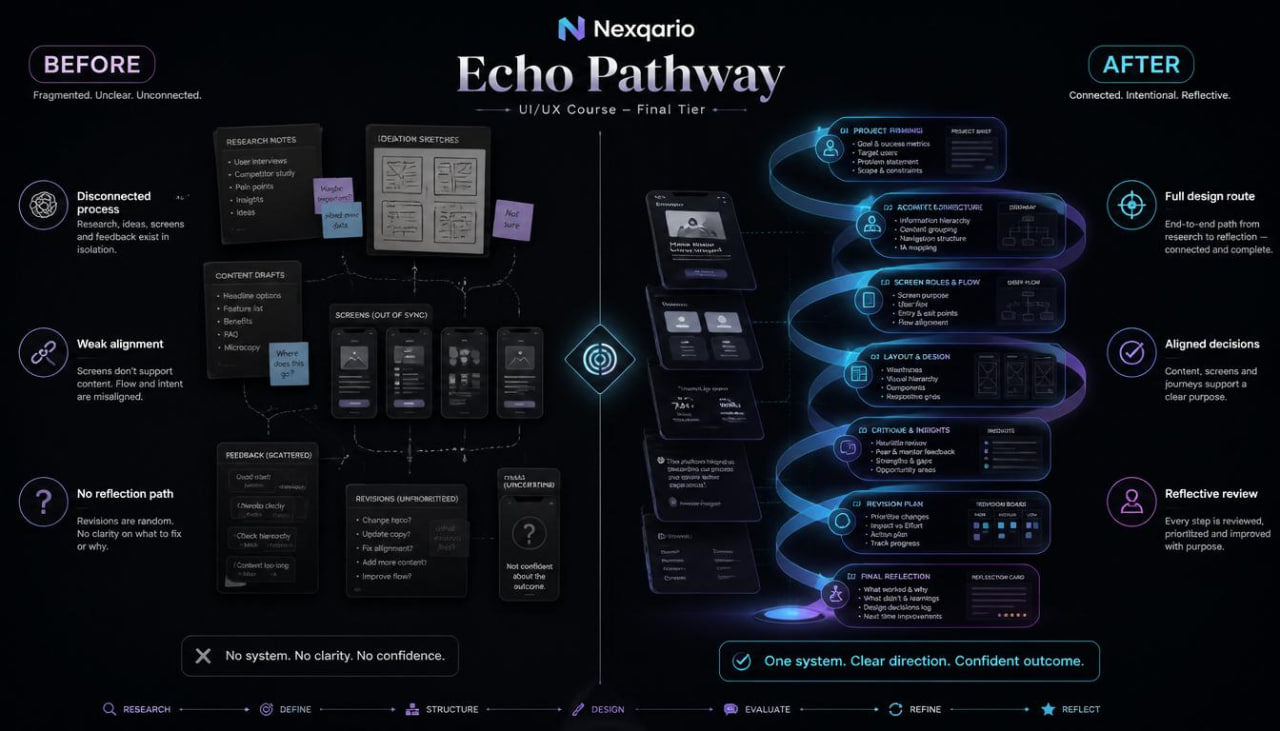
Learners who reach the final tier often have experience studying screens, layout, journey maps, content structure, and design notes, but they may still need a refined way to connect everything into one thoughtful process. A UI/UX exercise can include strong parts, yet still feel disconnected if the brief, user needs, content order, screens, and review notes are not aligned. Learners may also need a calmer way to evaluate their own work without rewriting every section at once. When reflection is missing, it becomes harder to understand which decisions were useful and which areas still need more study. Echo Pathway was created to help learners bring their full UI/UX process into a documented, reflective, and structured course experience.
2. Solution
Echo Pathway gives learners a guided course route for reviewing a full UI/UX study project from start to finish. The materials bring together project framing, user observation, content architecture, screen planning, journey mapping, layout review, critique notes, and reflection. Each part of the tier helps learners look back at their design choices and understand how one decision affected another. The course also guides learners through revision planning, so changes can be grouped by purpose instead of handled randomly. This creates a more thoughtful way to study UI/UX as an ongoing design practice.
3. What’s Inside
Echo Pathway includes a broad set of UI/UX learning materials created for learners who want to bring together the ideas studied across earlier Nexqario tiers. The tier begins with an orientation module that introduces reflection as a design tool. Learners are guided to look at a UI/UX project not only as a finished exercise, but as a record of choices, questions, notes, revisions, and learning moments.
The first module focuses on full-project framing. Learners study how to write a complete project brief that describes the interface type, user group, core task, content needs, and design challenge. The materials guide learners to keep the brief concise while still giving enough direction for later decisions. This brief becomes the reference point for the full course exercise.
The second module explores research and observation synthesis. Learners review user notes, interface observations, content questions, and possible friction points. The goal is to connect small observations into broader themes. For example, if several notes point to unclear navigation, dense content, or weak confirmation moments, learners group those findings and decide how they may influence the design path.
The third module focuses on content architecture. Learners study how to arrange information across a course page, dashboard, form flow, or learning area. They review headings, section descriptions, labels, help text, status messages, and action wording. The materials help learners decide what information belongs at the beginning, what belongs near a decision point, and what can appear later in the journey.
The fourth module introduces screen role planning. Each screen in the project is reviewed by purpose, content, user action, and follow-up state. Learners study how to check whether a screen has too many roles or not enough context. This helps them create cleaner screen plans and stronger connections between parts of the experience.
The fifth module focuses on journey alignment. Learners map how a person moves through the experience and compare that path with their project brief and content outline. They review entry points, decision moments, form states, confirmation areas, and support sections. The materials help learners notice where the journey may need more context, clearer wording, or a better section order.
The sixth module explores layout critique. Learners review spacing, grouping, alignment, visual hierarchy, section rhythm, and information density. Instead of changing the layout based only on visual preference, they write notes that connect layout choices to user understanding. This module encourages learners to explain why one section may need more breathing room, why an action area should move, or why a content group should be divided.
The seventh module brings the tier together through a capstone-style learning exercise. Learners create a full UI/UX study file with a brief, observation notes, content outline, journey map, screen notes, layout critique, revision plan, and final reflection. The exercise is designed for study and practice, not for outcome claims. It gives learners a structured way to gather their work and understand the path behind each design choice.
Echo Pathway also includes worksheets for project framing, observation synthesis, content architecture, screen roles, journey alignment, layout critique, revision planning, and reflection. These worksheets help learners keep their thinking organized across the entire course tier. Each worksheet supports a different part of the design process, allowing learners to return to earlier notes when reviewing later decisions.
The closing section focuses on reflective review. Learners look back at the full project and answer guided questions: What was the main design challenge? Which user needs shaped the structure? Which content decisions changed the flow? Which layout choices supported reading order? Which parts need more study later? This final reflection helps learners understand their design process with more care.
4. Who Is This For?
Echo Pathway is for learners who want to bring their UI/UX study into a fuller, more reflective course experience. It is suited for people who have already explored layout, patterns, journey mapping, documentation, and critique, and now want to connect those parts into one structured project route.
This tier may fit learners who enjoy full-project thinking, written reflection, and detailed design notes. It can also be useful for learners who want a stronger method for reviewing their own work and understanding how their decisions connect across a project.
Echo Pathway is also a good fit for learners who want to study UI/UX with a slower, more intentional rhythm. The tier gives space for planning, reviewing, revising, and reflecting, so learners can understand not only what they created, but how they arrived there.
5. What You’ll Learn
- How to write a complete UI/UX project brief
- How to group user observations into useful themes
- How to organize content across screens and flows
- How to define the role of each screen in a project
- How to connect screen purpose with user action
- How to review a journey from entry point to follow-up state
- How to compare a journey map with a content outline
- How to write layout critique notes with clear reasoning
- How to review spacing, grouping, hierarchy, and density
- How to organize revisions by content, flow, layout, and interaction
- How to build a full UI/UX study file
- How to use reflection questions to understand design decisions
- How to connect research notes, structure, content, flow, and revision into one learning path
6. 30-Day Refund Terms
For Echo Pathway, Nexqario may provide a 30-day refund window according to the store terms shown during checkout and on the refund policy page. Refund requests are reviewed through the support channel and may depend on order status, material delivery conditions, and the terms connected to this course tier. Learners should review the policy details before ordering and contact the Nexqario team with any questions about the course materials or refund process.
Self-paced learning overview
- 📁 Digital file available after purchase
- 🗂️ Long-term availability
- 🔒 Secure checkout
- 🧩 Content updated in 2026
Do I need previous UI/UX knowledge?
Do I need previous UI/UX knowledge?
No previous UI/UX background is required for the beginner-friendly tiers. Each tier is arranged with a clear learning order, so learners can study the material at a comfortable pace and return to key ideas when needed.
What do the course materials include?
What do the course materials include?
Depending on the tier, the materials may include lessons, modules, design prompts, worksheets, layout references, research notes, interface exercises, and guided study tasks. Each tier is shaped around a different depth of learning.
How should I choose a tier?
How should I choose a tier?
Choose a tier based on how deeply you want to study UI/UX at this stage. Free Capsule is a light starting point, while higher tiers move into broader topics, richer materials, and more detailed learning paths.
Share