Nexqario
Free Capsule
Free Capsule
Couldn't load pickup availability
1. Problem Statement
Many learners are curious about UI/UX, but they do not always know where to begin. Design education can feel scattered when topics such as layout, research, visual structure, and user flow appear without a clear order. Beginners may open random resources, collect notes, and still feel unsure about how the pieces connect. Free Capsule was created to give learners a gentle first step into UI/UX study. It helps turn curiosity into a more organized learning routine without making bold claims or overwhelming the learner.
2. Solution
Free Capsule offers a compact introduction to UI/UX through structured materials and focused study prompts. Instead of presenting too much at once, this tier gives learners a simple path for observing interfaces, noticing patterns, and thinking about user needs. The materials are arranged to help learners understand how design decisions affect clarity, movement, and interaction. Each part encourages slow observation, written notes, and small practice tasks. This makes Free Capsule a useful starting point before moving into deeper Nexqario course tiers.
3. What’s Inside
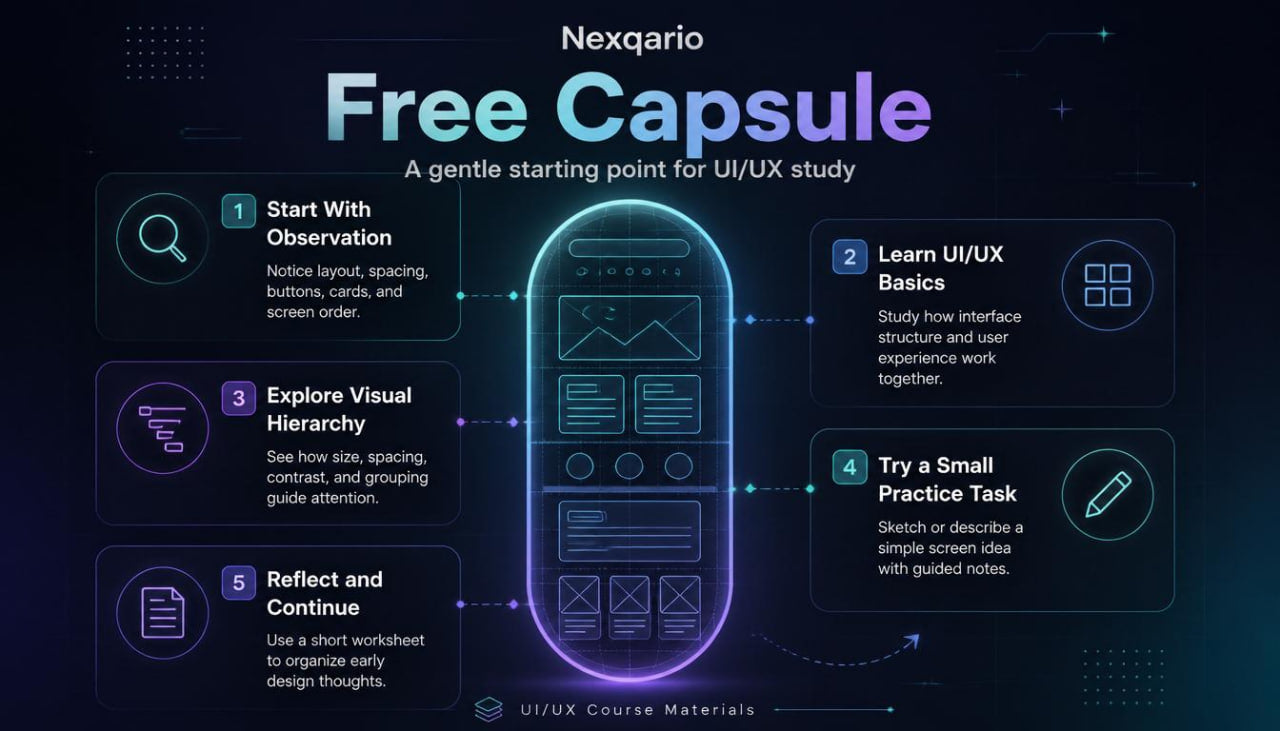
Free Capsule includes a starter set of UI/UX learning materials designed for first contact with the subject. The tier begins with an orientation module that explains what UI and UX mean in everyday design language. It does not overload the learner with heavy terminology, but instead introduces the basic relationship between visual layout, user intention, and interaction flow.
The first section focuses on interface observation. Learners are guided to look at screens, menus, cards, forms, buttons, spacing, and page structure with a more thoughtful eye. The goal is not to judge designs as good or bad, but to understand why certain choices may help a person move through a digital experience with less confusion.
The second section introduces visual hierarchy. This part explains how size, spacing, contrast, grouping, and placement can shape what a viewer notices first. Learners receive short prompts that encourage them to compare different layout choices and write down what feels clear, crowded, calm, or distracting.
The third section explores user flow. It introduces the idea that every screen has a purpose and every interaction should guide the viewer toward a next step. Learners study simple examples of how a person might move from one screen to another and how design can support that movement.
The fourth section gives a small practice task. Learners are invited to sketch or describe a simple interface idea, such as a sign-up screen, profile card, learning dashboard, or booking form. The task is intentionally light, so the learner can focus on structure rather than visual polish.
Free Capsule also includes a reflection worksheet. This worksheet helps learners summarize what they noticed, which design ideas felt new, and which topics they may want to study later. The worksheet supports a slower, more mindful study process and helps learners build a personal design vocabulary.
The final part introduces the Nexqario course style. It gives a short overview of how later tiers may explore research, wireframes, layout systems, design critique, content structure, and interface planning. Free Capsule does not claim to cover everything. It simply gives learners a clear first look at the learning environment and the type of design thinking Nexqario encourages.
4. Who Is This For?
Free Capsule is for learners who are curious about UI/UX and want a simple starting point before choosing a deeper course tier. It is suitable for people who enjoy visual thinking, digital layouts, and the way design shapes online experiences. It can also be useful for learners who have heard about UI/UX but are not yet sure which part of the field interests them.
This tier is a good fit for beginners who want a light introduction rather than a dense course. It may also suit creative learners who want to explore interface structure, design language, and user-focused thinking without making a large commitment at the start.
Free Capsule is also suitable for people who prefer organized materials over scattered notes. The tier gives a short but thoughtful path, helping learners move from “I am curious about UI/UX” to “I understand some basic ideas and can name what I want to study next.”
5. What You’ll Learn
- How UI and UX relate to digital design experiences
- How to observe interface structure with more attention
- How spacing, grouping, and visual order affect clarity
- How user flow connects screens and actions
- How to describe layout choices using design language
- How to review a simple interface without relying only on personal taste
- How to notice friction points in a screen or flow
- How to begin thinking from the viewer’s perspective
- How to organize early UI/UX notes into useful study reflections
- How Nexqario structures its learning materials across course tiers
6. 30-Day Refund Note
Free Capsule has no charge, so no payment reversal is needed for this tier. For paid Nexqario tiers, the store may provide a 30-day refund window according to the refund terms shown at checkout and on the store policy page. Learners should review those terms before placing an order, since refund handling may depend on the course tier, delivery status, and store conditions.
Self-paced learning overview
- 📁 Digital file available after purchase
- 🗂️ Long-term availability
- 🔒 Secure checkout
- 🧩 Content updated in 2026
Do I need previous UI/UX knowledge?
Do I need previous UI/UX knowledge?
No previous UI/UX background is required for the beginner-friendly tiers. Each tier is arranged with a clear learning order, so learners can study the material at a comfortable pace and return to key ideas when needed.
What do the course materials include?
What do the course materials include?
Depending on the tier, the materials may include lessons, modules, design prompts, worksheets, layout references, research notes, interface exercises, and guided study tasks. Each tier is shaped around a different depth of learning.
How should I choose a tier?
How should I choose a tier?
Choose a tier based on how deeply you want to study UI/UX at this stage. Free Capsule is a light starting point, while higher tiers move into broader topics, richer materials, and more detailed learning paths.
Share